
Turn customer relationships into connected business processes.
Epicarp helps organisations design and implement Microsoft Dynamics 365 CRM around the way their sales and customer teams actually work — connecting leads, opportunities, activities, forecasting, automation and business data into one structured customer journey.
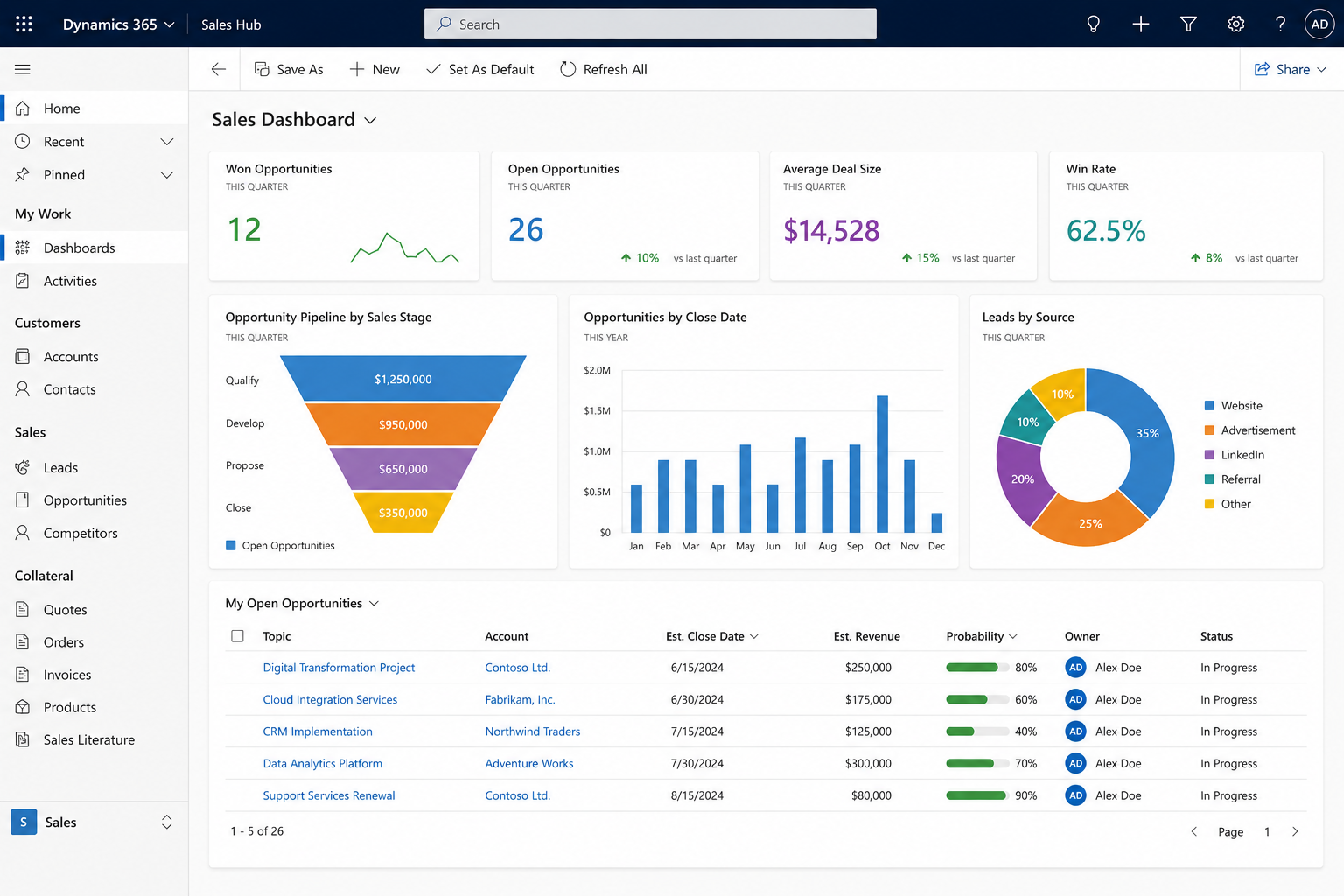
Customer data exists. The process around it often doesn’t.
Sales teams often have the information they need, but it is spread across spreadsheets, email, individual follow-ups and disconnected systems.
As the business grows, this makes it harder to understand which opportunities need attention, whether follow-ups are happening, how reliable the forecast is, and what should happen after a deal is won.
Sales tracked in spreadsheets
Pipeline data sits in individual files, making ownership, status and forecasting difficult to manage consistently.
Follow-ups depend on memory
Customer activity is often managed through personal inboxes, calendars and informal reminders.
Limited pipeline visibility
Management cannot easily see what is moving, what is stalled and where the real revenue risk sits.
CRM and ERP stay disconnected
Once an opportunity is won, information is frequently re-entered into another system for ordering, billing or delivery.
We design Dynamics 365 CRM around the complete sales process — from lead capture and opportunity management through automation, reporting and operational handoff.
One customer journey. Connected from first interest to growth.
Dynamics 365 CRM gives sales and customer teams a structured way to manage the complete relationship — keeping customer information, activity, opportunity progress and business handoffs connected as the relationship develops.
Lead
Capture enquiries, referrals, campaigns and new prospects.
Qualify
Understand need, fit, potential value and next action.
Opportunity
Manage value, stage, stakeholders and activities.
Proposal
Coordinate pricing, quotation and approvals.
Win
Confirm the deal and capture the final outcome.
Handoff
Connect sales with ERP, delivery or service teams.
Grow
Support renewals, account growth and retention.
Accounts, contacts, activities, opportunities, documents, automation and reporting stay connected so teams can work from the same customer picture.
From CRM design to connected sales operations.
We help organisations move beyond basic CRM configuration by designing Dynamics 365 around the full sales and customer process — including workflow, reporting, security, data and system integration.
CRM Strategy & Solution Design
We map your sales process, roles, data, customer journey and reporting needs before designing the CRM structure around how the business actually operates.
Dynamics 365 Sales Implementation
Configure leads, opportunities, accounts, contacts, activities, sales stages, quotations and pipeline management within Dynamics 365 Sales.
CRM Customisation
Extend Dynamics with custom forms, views, Dataverse tables, business rules, process stages and role-specific experiences where standard configuration is not enough.
Workflow & Process Automation
Use Power Automate to manage lead assignment, reminders, approvals, follow-ups, escalations, notifications and operational handoffs around the sales process.
Integration & Data Connectivity
Connect CRM with ERP, SAP, Microsoft 365, portals, business applications and external systems so customer and transaction data can move between processes.
Reporting & Sales Analytics
Build management dashboards for pipeline, forecast, conversion, sales performance, target achievement, customer trends and opportunity movement using Dynamics 365 and Power BI.
The objective is not to customise everything — it is to use Dynamics 365 effectively and extend only the areas that create real operational value.
Extend Dynamics around how your business actually operates.
Dynamics 365 becomes significantly more valuable when it connects with the applications, automation, analytics and operational systems around it. We use the broader Microsoft ecosystem to extend CRM where the business needs more.
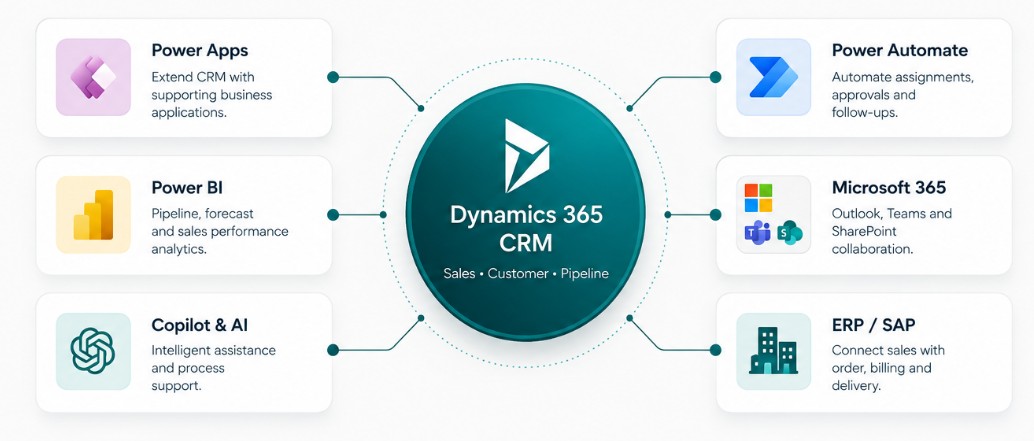
CRM becomes the customer-facing layer of a wider operation.
Use Power Apps for supporting workflows, operational applications and role-specific experiences without over-customising the core CRM.
Trigger assignments, reminders, approvals, escalations, document workflows and downstream actions using Power Automate.
Combine Dynamics data with targets, financial information and other systems through Power BI for deeper sales analytics.
Integrate confirmed sales information with ERP, SAP, delivery, billing and service processes to reduce manual re-entry.
Dynamics 365 handles the core customer and sales process, while Power Platform, Microsoft 365, analytics and ERP integrations extend the operating model where needed.
More than CRM configuration. We think about the operation around it.
Dynamics 365 creates the most value when the platform, sales process, users, data, automation and downstream systems are designed to work together. That wider operating view shapes how we approach every CRM implementation.
Process Before Platform
We first understand how sales, customer engagement and business handoffs should work — then configure Dynamics around that operating process.
Broader Microsoft Capability
Power Apps, Power Automate, Dataverse, Power BI, Microsoft 365 and AI allow us to extend CRM without forcing every requirement into the core application.
Connected Business Thinking
We consider how customer data needs to move into ERP, SAP, reporting, delivery and service processes so CRM remains connected to what happens after the sale.
Built to Last Beyond Go-Live
Security, ownership, usability, adoption and maintainability are considered alongside functionality so the CRM remains practical as the business evolves.
A successful CRM should give sales teams a simpler way to work, management better visibility and the wider organisation cleaner information to act on.
Questions about building a connected sales operation.
Practical answers around Dynamics 365 Sales, customer data, sales processes, automation, integration, reporting, security and adoption.
Understanding Dynamics 365
01 What is Dynamics 365 Sales and what problem does it solve?
Dynamics 365 Sales provides a structured way for sales teams to manage customer information, leads, opportunities, activities and sales progress in one connected environment.
It can replace fragmented tracking across spreadsheets, emails and individual files with a shared sales process where ownership, customer history and opportunity status are easier to understand.
02 Is Dynamics 365 only for large sales organisations?
No. The value of CRM depends more on the complexity of the sales process than simply the number of salespeople.
Even a smaller team may benefit where leads, customer interactions, quotations, follow-ups and opportunities need to be managed consistently.
The system should support how your team sells rather than introduce unnecessary complexity.
03 Can Dynamics 365 replace our existing Excel-based sales tracker?
In many scenarios, yes. Dynamics 365 can provide a more structured approach where customer records, opportunities, activities and ownership are maintained centrally.
Moving away from shared spreadsheets can also help reduce duplicate records, inconsistent updates and uncertainty about which version contains the latest information.
04 Do we need to implement every Dynamics 365 feature from day one?
No. A focused implementation is usually easier for users to understand and adopt.
Organisations can begin with the core customer and sales process and introduce additional automation, reporting, integrations or capabilities as requirements mature.
Managing the sales journey
05 What parts of the sales process can Dynamics 365 manage?
Dynamics 365 can provide a connected view of the key information and activities around the customer and sales lifecycle.
Track potential customers.
Maintain customer organisations.
Manage customer relationships.
Track potential revenue.
Capture sales interactions.
Understand sales progress.
06 Can we configure Dynamics 365 around our own sales stages?
Yes. The CRM should reflect the meaningful stages and information required by your sales organisation.
The objective is not simply to reproduce every existing step. We first understand how leads progress, where approvals or handoffs occur, and what information management needs to see.
07 Can Dynamics 365 help with follow-ups and repetitive sales activities?
Yes. Sales processes can be supported by workflows and automation where repetitive coordination adds unnecessary effort.
Assign Route records to the right owner.
Notify Alert users when action is required.
Follow Up Support consistent activity tracking.
Escalate Surface ageing or overdue activity.
Approve Coordinate selected business approvals.
Update Reduce repeated manual processing.
08 Can managers see their team's pipeline while salespeople see only relevant records?
Dynamics 365 can be designed with role-based access so different users receive the level of visibility appropriate to their responsibility.
Connecting CRM with the wider business
09 Can Dynamics 365 integrate with our ERP or SAP system?
Yes, where suitable integration interfaces are available. CRM and ERP normally serve different business purposes, so integration can help information move between the customer-facing and transactional processes.
Integration design should consider ownership of data, validation, transaction reliability, duplicate prevention, error handling and support requirements.
10 How can Dynamics 365 work with Microsoft 365?
Dynamics 365 can form part of a broader Microsoft working environment rather than operating as an isolated CRM.
The exact Microsoft 365 integration should be selected according to the user's workflow and the organisation's configuration.
11 Can Dynamics 365 be extended using Power Platform?
Yes. Dynamics 365 and Power Platform can work together to extend the CRM around broader operational requirements.
This is useful when requirements extend beyond the standard sales process into approvals, operations, integration or management reporting.
12 Can management get dashboards and sales performance visibility?
Yes. Reporting can be designed around the information management actually needs to review rather than simply displaying every CRM field.
Where deeper analytics are required, Dynamics 365 data can also form part of a broader Power BI reporting solution.
Building a CRM people can actually use
13 How is access to customer and sales information controlled?
Access should be designed around business responsibility rather than giving every user the same visibility.
Who is accessing the CRM?
What is their responsibility?
Which records should they see?
What may they change?
Security roles and the underlying Dataverse security model can be configured to support the required access structure.
14 How do we migrate our existing customer and sales data?
Existing customer and sales data should be reviewed before migration rather than moving every historical record without validation.
This is an opportunity to remove duplicate, incomplete or obsolete information before users begin working in the new CRM.
15 How does Epicarp approach a Dynamics 365 implementation?
We begin with the sales process, users, information and business outcomes before configuring the CRM.
The objective is not simply to configure CRM features. It is to create a sales working environment users can understand and maintain.
16 What about Dynamics 365 licensing and ongoing support?
Licensing should be reviewed against the specific Dynamics 365 products, user roles and capabilities required by the solution.
We prefer to confirm the functional design first and then align licensing appropriately, rather than designing the entire CRM around assumptions about licensing.
Microsoft licensing changes over time, so the applicable licensing model should be validated as part of the implementation.
After go-live, support can include configuration changes, workflow enhancements, new reports, integration improvements and evolving sales requirements.
Thinking about Dynamics 365 CRM? Start with the way your business sells.
Bring us your current sales process, CRM challenge, reporting requirement or integration need. We’ll help identify what should stay standard, what should be automated and where Dynamics 365 can create the most value.
Bring us one CRM challenge.
Pipeline visibility, workflow automation, sales reporting, ERP integration or CRM redesign — tell us where the current process is creating friction.
Discuss Your CRM Requirement